Leads and quotes
- Automatic welcome and details form on WhatsApp
- Lead scoring and assignment
- Teams meetings, reminders and minutes
- Quotes as drafts you approve
- Quote acceptance by link
From the client's first message to project handover, one system follows every step with you.
Every day, your office hears the same questions.
With emerge, the answer is there before anyone asks. Here is what that looks like in your office.
First contact
The system, on your office's number. It welcomes them, takes their details through one form, records them as a lead and alerts your team.
The contract
Upload the title deed, land survey, soil report and ID. The system reads them and fills the empty contract boxes, and you review them before sending.
12
Engineering design · Supervision · Interior design · Project management · Structural design · MEP · Fire and life safety · Technical report · Hydrological study · Land survey · Unit subdivision · Soil investigation
The project
The contract becomes a ready project: the service, site, each discipline's engineer and each stage's days, with no re-entry. Each engineer gets a message when their stage starts.
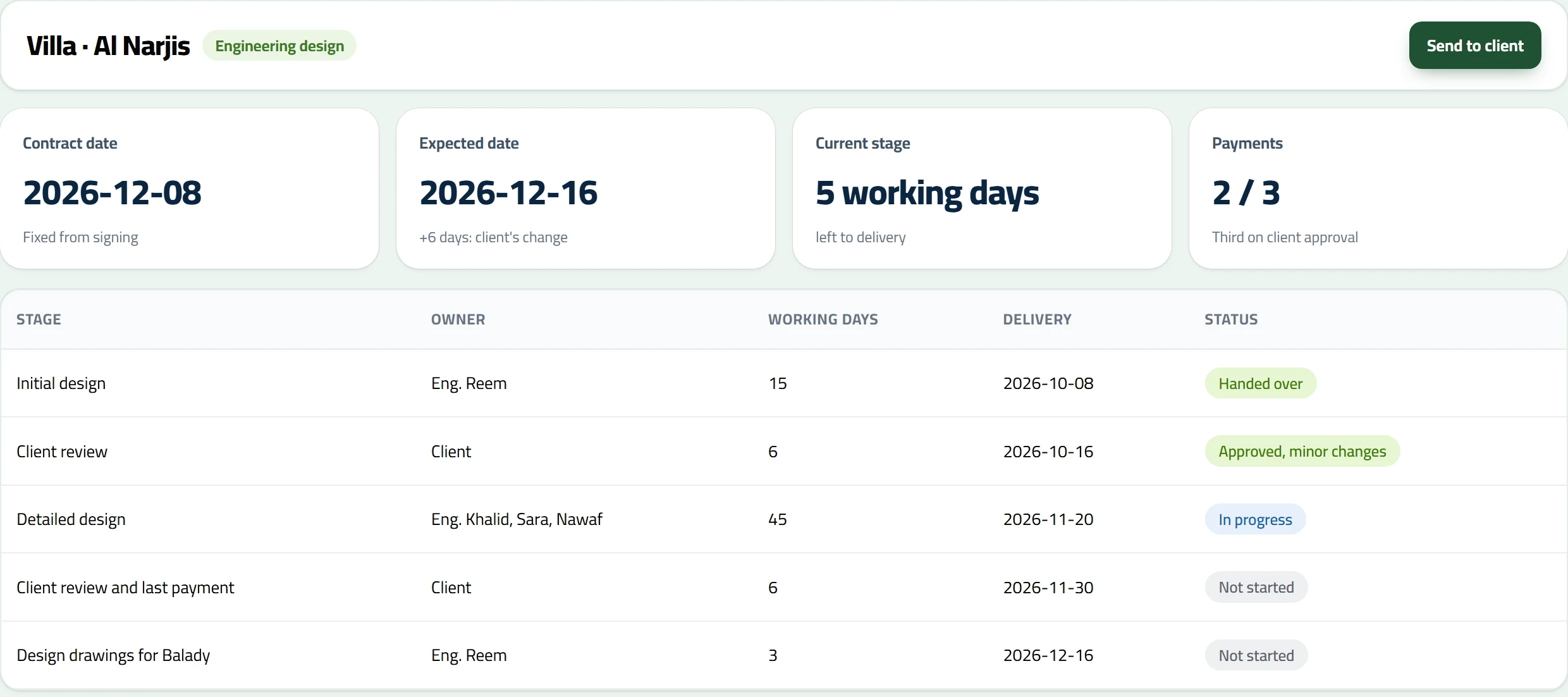
The contract date stays fixed from signing, in working days and your office's holidays. Every added day has a recorded reason under its own name, seen by the office and the client.
The files
There's only one live file for each discipline. An engineer opens it from the project page and it stays locked to them until they finish, so nobody edits over someone else's work.
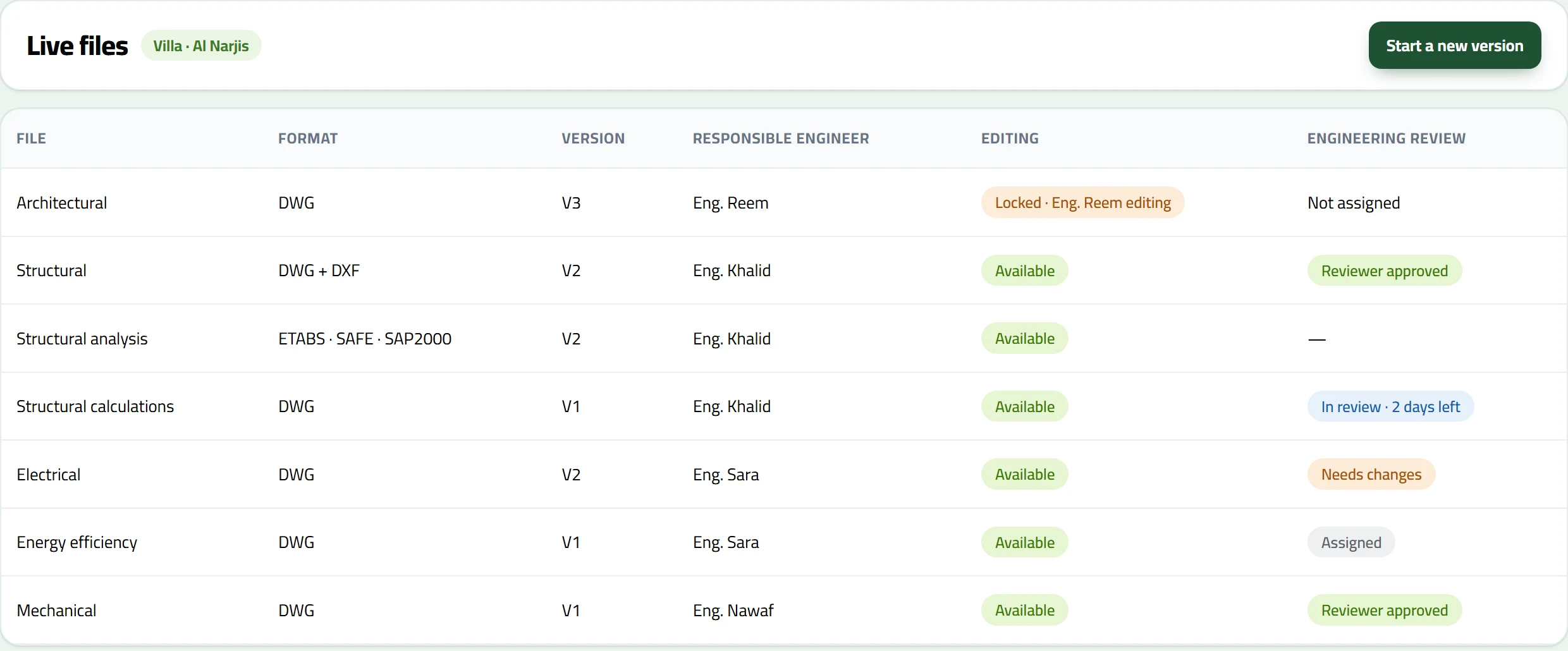
Under every file a manager picks one or more reviewers, with a deadline and view or edit access. The system knows who did the work, who reviewed it and who delayed it, and reviewer days don't count against the engineer.
Tick PDFs from any discipline and the client receives one numbered package, on WhatsApp and in their portal.
The client portal
They won't need to. Each client has a private portal that installs on their phone like an app, with notifications, and reads directly from their project's record in your system.
Try the portal
The current stage, the contract and expected delivery dates, every stage with its dates, and the site on a map.
Villa · Al Narjis
Payments
Each invoice arrives on time with its payment link: at signing, after the initial designs are approved, and when the drawings are approved. If they transfer and send the receipt on WhatsApp, the system reads it and records it when the amount matches.
On site
One link per supervision project, with no login. They see only the open stage, send requests to the responsible engineer and get the answer on WhatsApp.
Management
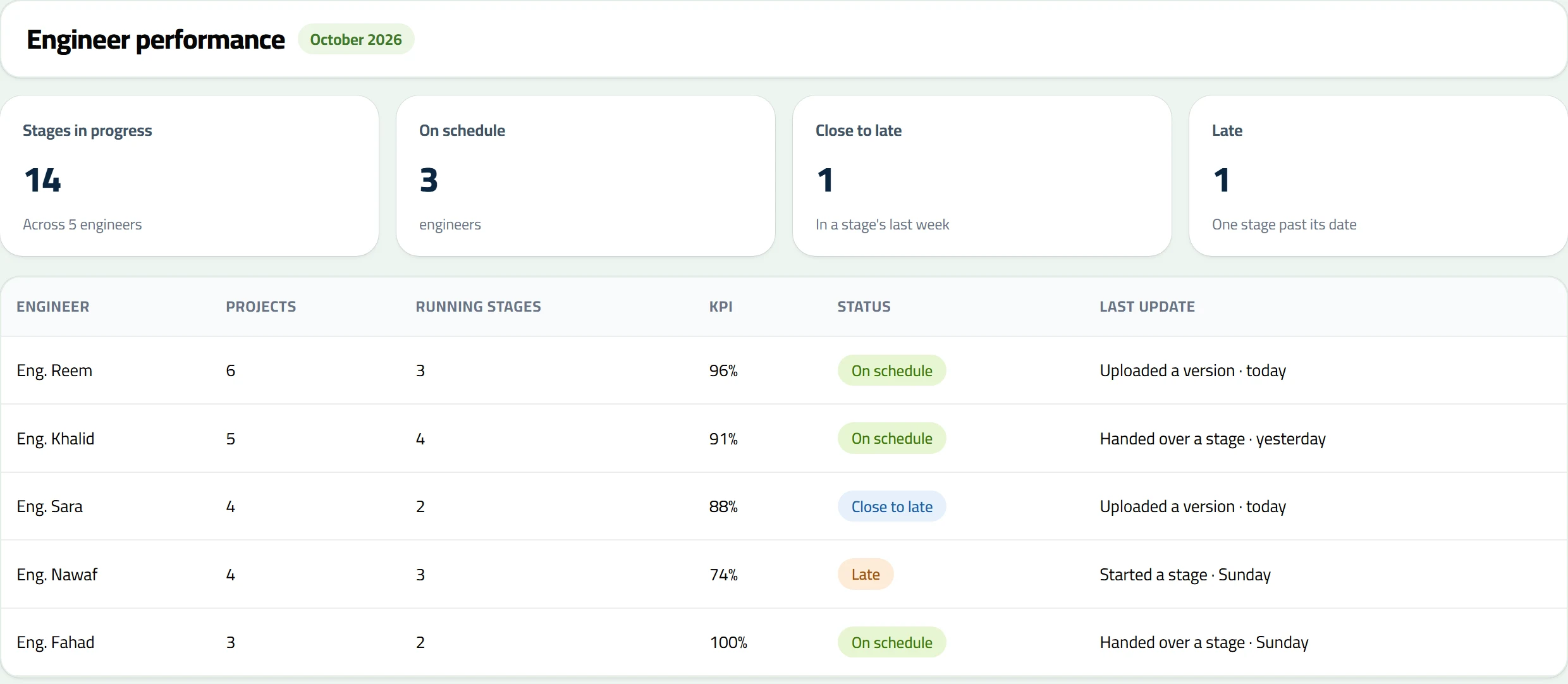
Ask the system on WhatsApp, by text or voice. Or open one board with every engineer: their projects, stages, KPI, and who is close to late.
No. Engineers keep working in AutoCAD, ETABS, SAFE and SAP2000 on their own computers through a small helper tool. The system organises the file: who edits it, its versions, its review and its delivery.
No app store. The portal reaches them by link and they can add it to their phone's home screen. Uploading documents works through a link with no login.
Not for files, which stay in your office's space inside the system if you don't connect OneDrive. Teams meetings, their recordings and minutes, and email from your office's account do need a connected Microsoft 365 account.
No. The system tracks the Balady drawings stage in the project schedule. Submitting on government platforms stays with your office.
Welcomes, collecting details and reminders run automatically. Quotes are drafts you approve, you send contracts and deliveries yourselves, and a receipt that doesn't match comes back to you.
Through a Moyasar payment link with the invoice once your account is connected, by bank transfer with the receipt sent on WhatsApp, or in cash using a button in the system that sends a paid invoice.
Yes. Stage lists and days are in Settings, each contract's wording can be edited before it goes out, and on design contracts you edit stages and payments from the contract itself.
Or reach us directly